If you’re bottling hot sauce, your Nutrition Facts panel might look strange to you the first time you generate it: a column of zeros with one large sodium number sitting in the middle. That’s not a mistake, and trying to “fix” the panel so it looks more balanced is how brands end up out of compliance.
This guide is a single-product walkthrough that covers what it takes to label hot sauce: how the FDA regulates it, the serving size and sodium rules that shape the panel, the right Nutrition Facts format for a small bottle, and the other required elements like allergens, before walking you through building the whole label step by step. By the end you’ll be able to build a compliant label in Food Label Maker start to finish.
If you need your hot sauce label done fast, hire one of our regulatory experts who can create an FDA-compliant hot sauce label for you in 3-5 business days.
How Is Hot Sauce Regulated by the FDA?
Hot sauce falls under the FDA as a standard food, which keeps it simpler to label than meat or poultry products that answer to the USDA. Unlike ketchup, which the FDA defines under a formal standard of identity, hot sauce has none. The FDA hasn’t set a fixed recipe or minimum pepper content you must meet to call your product “hot sauce,” so you’re free to build and name the recipe how you want.
Because hot sauce has no standard of its own, it simply follows the general FDA regulations that apply to any packaged food such as: Nutrition Facts panel,ingredient list,allergen declarations, and any nutrient content claim.
The one place hot sauce gets its own specific treatment is the serving size, and that single number shapes how the rest of the nutrition panel reads.
What Goes on a Hot Sauce Nutrition Facts Panel
Hot sauce produces one of the strangest looking panels in the food aisle: a column of zeros with a single sodium value sitting in the middle. It looks like something went wrong, but it’s the correct, compliant result.
Here’s why it happens and how to read it.
Why Hot Sauce Uses a 1-Teaspoon Serving Size
Every Nutrition Facts panel is built on the Reference Amount Customarily Consumed, the RACC, which the FDA assigns by food category in 21 CFR 101.12. For hot sauce, the RACC is 1 teaspoon, or 5 grams. That tiny reference amount is the reason the panel reads the way it does. There simply isn’t enough of any nutrient in a teaspoon for most of them to register once the FDA’s rounding rules are applied.
Calories, Sodium, and %DV on a Hot Sauce Label
Say a teaspoon of your sauce contains 190mg of sodium. Under the FDA rounding rules, sodium above 140mg rounds to the nearest 10mg, so 190mg displays as 190mg. Against the 2,300mg Daily Value, that’s 8% DV. Everything else in that teaspoon is negligible. Calories come in under 5 and display as 0, total fat rounds to 0g, total carbohydrate falls below 0.5g and rounds to 0g, and protein rounds to 0g.
So the finished panel reads: 0 calories, 0g fat, 190mg sodium (8% DV), 0g carbohydrate, 0g protein. A column of zeros with one real number. That is exactly what the FDA expects, and shrinking the serving size to make the sodium look smaller is a misbranding risk rather than a fix.
Why Most Hot Sauces Can’t Be Labeled “Low Sodium”
Because the per-serving numbers look so small, it’s tempting to add a “low sodium” claim. Under 21 CFR 101.61, “low sodium” requires less than 140mg per RACC, and “sodium free” requires less than 5mg. Salt is usually a lead ingredient in hot sauce, so both are out of reach for most recipes. The FDA measures the claim against the per-RACC threshold, not against how the sodium looks next to the surrounding zeros.
One more trap worth knowing: the small-package exemption that some bottles under 12 square inches qualify for disappears the moment you make any nutrient content claim, so keep in mind that claiming “low sodium” forces a full panel even on a tiny bottle.
See How FoodLabelMaker Can Help You
What Is The Correct Nutrition Fact Panel Format For Hot Sauce?
Most food manufacturers treat the panel format as a design preference. But, it actually follows strict FDA regulations, and hot sauce happens to qualify for the space-saving formats that many larger products can’t use. Picking the right one keeps you compliant and frees up room on a small bottle at the same time.
How Many Servings Are in a Hot Sauce Bottle?
Servings per container is just your package volume divided by the 5 mL serving size, and you need it before you finalize the panel.
For example, a hot sauce batch that comes to 1,170g, fills about 8 standard bottles, but the number that belongs on the label is the servings in the single bottle you sell, not the whole production run. A standard 5 fl oz (148 mL) woozy bottle, the most common hot sauce format, holds about 30 servings at 1 teaspoon (5 mL) each. A 12 fl oz (355 mL) bottle holds roughly 71.
Whichever bottle you fill, divide its volume by 5 mL and that’s the figure your label needs.
💡What’s a Woozy Bottle?
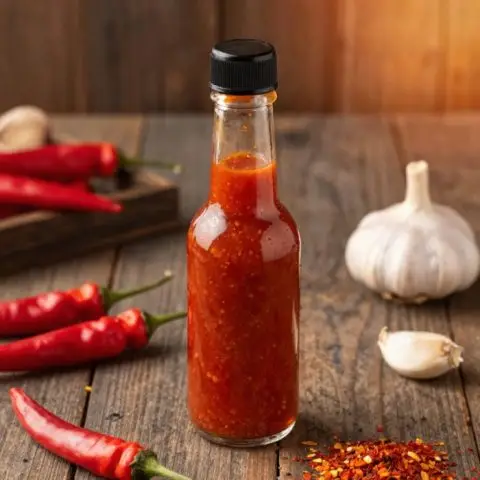
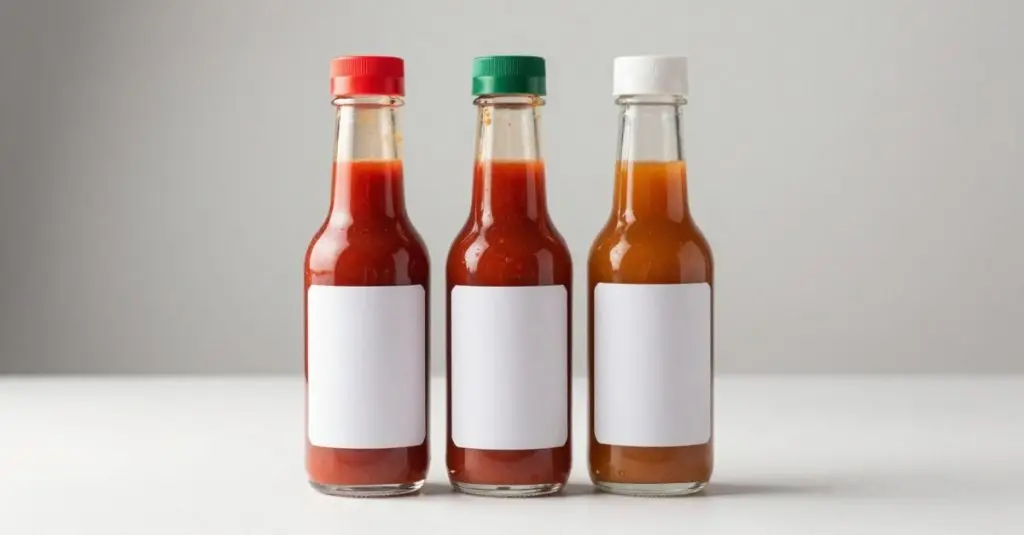
It’s the tall, narrow glass bottle with a long neck that most hot sauces come in. The shape is practical: the slim neck controls the pour so a little potent sauce goes a long way, and the straight sides give you room for a label and Nutrition Facts panel. The standard size is 5 fl oz (148 mL), which is the bottle we use for the servings math in this guide.
Vertical, Tabular, or Linear Format for Hot Sauce
The standard vertical panel is the default and fits most woozy bottles, which have the height to carry it. If your bottle is too short for the vertical layout, the tabular format is the next option. For small or narrow bottles where the total available label space drops below 40 square inches, the linear format is permitted and gives you the smallest footprint, which is why a lot of hot sauce brands are moving to it. For a full breakdown of how each layout works and when to use it, see our guide to the different nutrition facts label formats.
How To Use the Simplified Nutrition Label Format for Hot Sauce
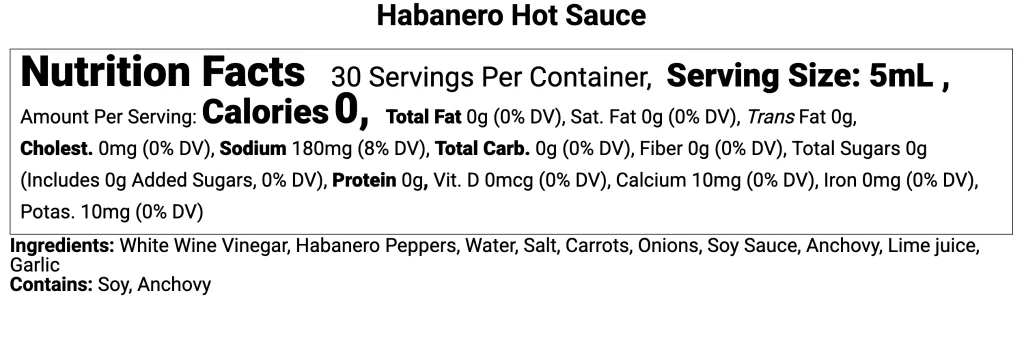
This is the one that matters most for hot sauce. The FDA allows a simplified panel when a product contains insignificant amounts of eight or more of the required nutrients, which describes almost every hot sauce given how many values are rounded to zero.
In this example of Habanero Hot Sauce, only sodium carries a meaningful value, so it qualifies easily. The simplified format then shows just calories, total fat, sodium, total carbohydrate, and protein, dropping the long list of vitamins and minerals that would otherwise sit there as zeros. Those zeros are the reason you qualify, and the simplified format is how you turn them into saved space instead of wasted space.
How to Build Your Hot Sauce Label Step by Step
Here’s the whole process in Food Label Maker, using the Habanero Hot Sauce as a worked through example.
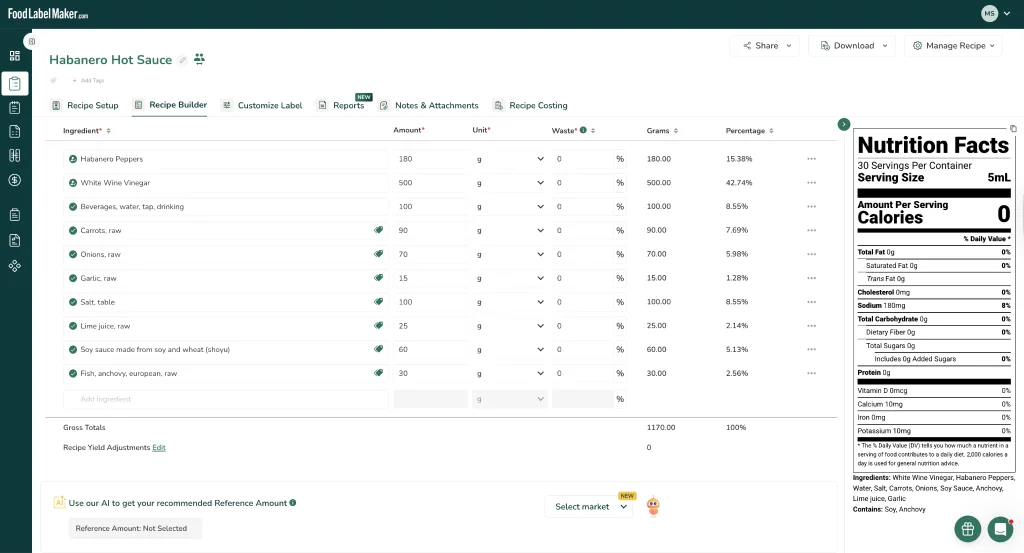
Step 1: Enter your recipe by weight.
In the Recipe Builder, add every ingredient with its actual weight in grams, water and vinegar included. Hot sauce is liquid-heavy, so accurate weights matter far more than volume estimates.
Step 2: Mix volume and weight units if you need to.
Weighing every ingredient gives the most accurate panel, but recipes rarely come that tidy.
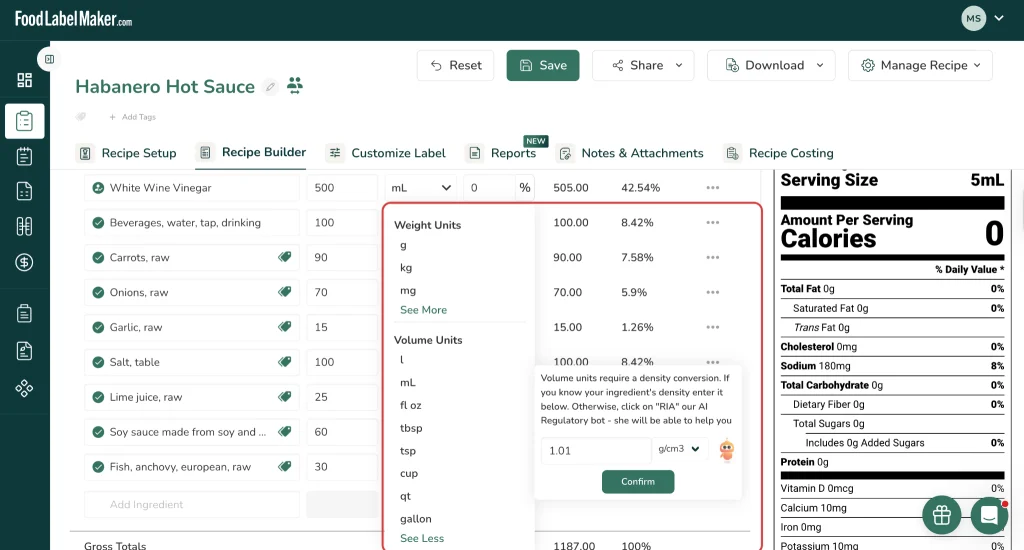
If yours lists a cup of vinegar here and a tablespoon of salt there, you don’t have to convert anything by hand. Enter each ingredient in whatever unit you have. When you pick a volume unit like mL or fl oz, Food Label Maker flags that it needs a density conversion. If you know the density you can type it in, or let RIA, our Regulatory Intelligence Assistant, suggest the closest match from the FAO/INFOODS density database so your volumes turn into accurate gram weights.
It’s especially handy for a liquid-heavy product like hot sauce, where most of the recipe is pourable.
Step 3: Set your serving size and servings per container.
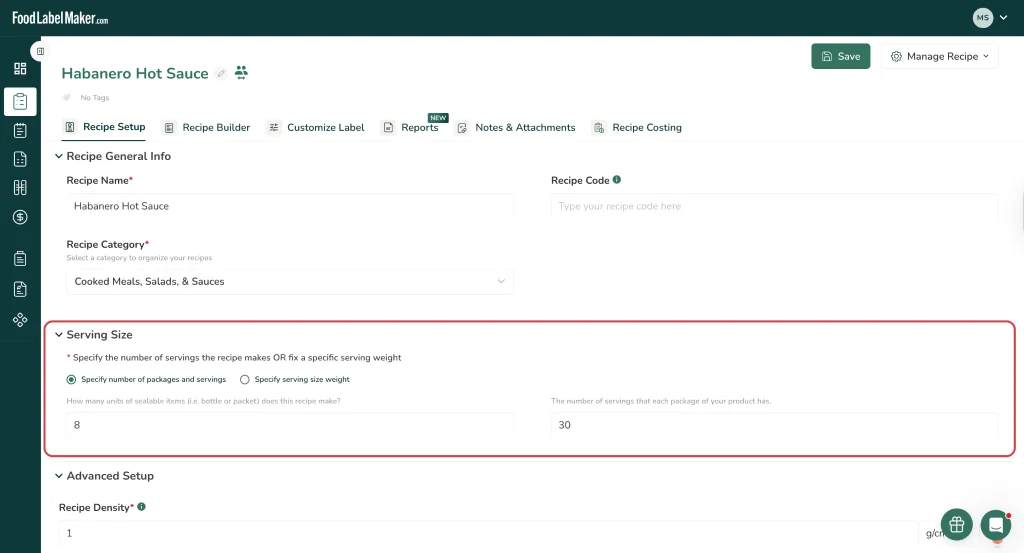
Start in the Recipe Setup and “Specify number of packages and servings” and enter the bottle you’re actually selling: 8 bottles from the batch, 30 servings each, so the label reads “30 Servings Per Container” for a standard 5 fl oz woozy bottle.
Then go to the Recipe Builder and use the AI RACC check, which confirms the correct reference amount for your product. For hot sauce it lands on the “Minor condiments” category and sets the serving size to 1 teaspoon (5 mL).

Step 4: Review the generated panel and read the sodium.
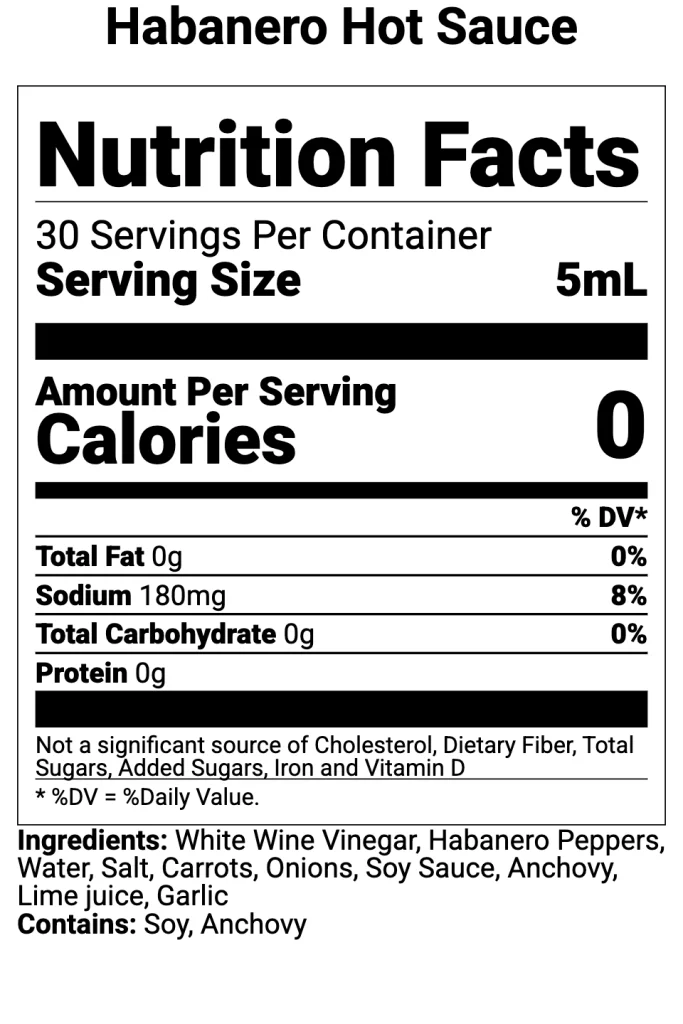
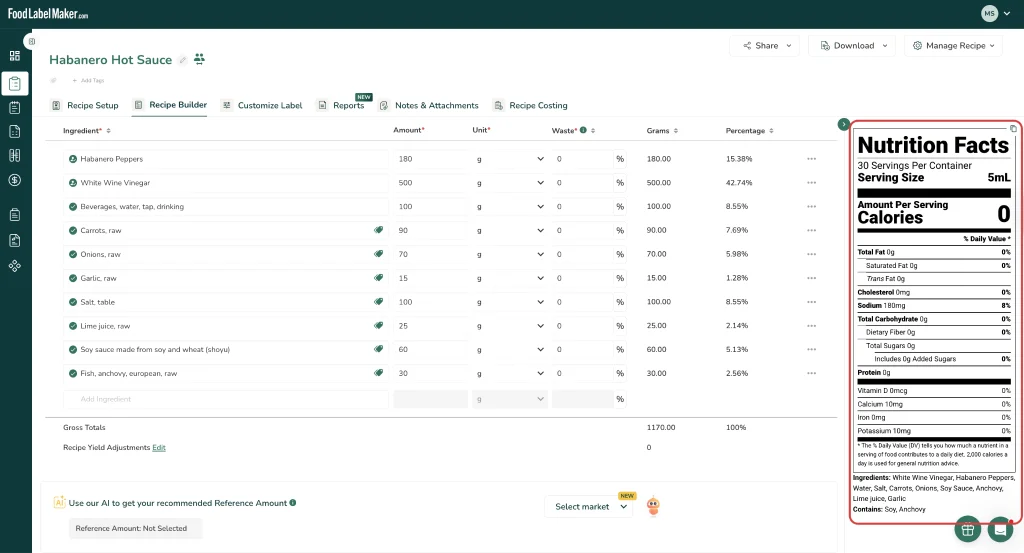
The panel comes back almost entirely zeros, with sodium at 180mg (8% DV). That’s the correct result for hot sauce, not an error. Everything else (calories, fat, carbs, protein) is too small in a 5 mL serving to round up from zero.
Step 5: Check which nutrient content claims you can make.
Before adding any claim, look at the thresholds. At 180mg of sodium per serving, this sauce is over the 140mg “low sodium” limit, so that claim is off the table. The claims panel does flag others it qualifies for, like fat free and sugar free, but remember any nutrient content claim cancels the small-package exemption.

Step 6: Add the rest of your required label elements.
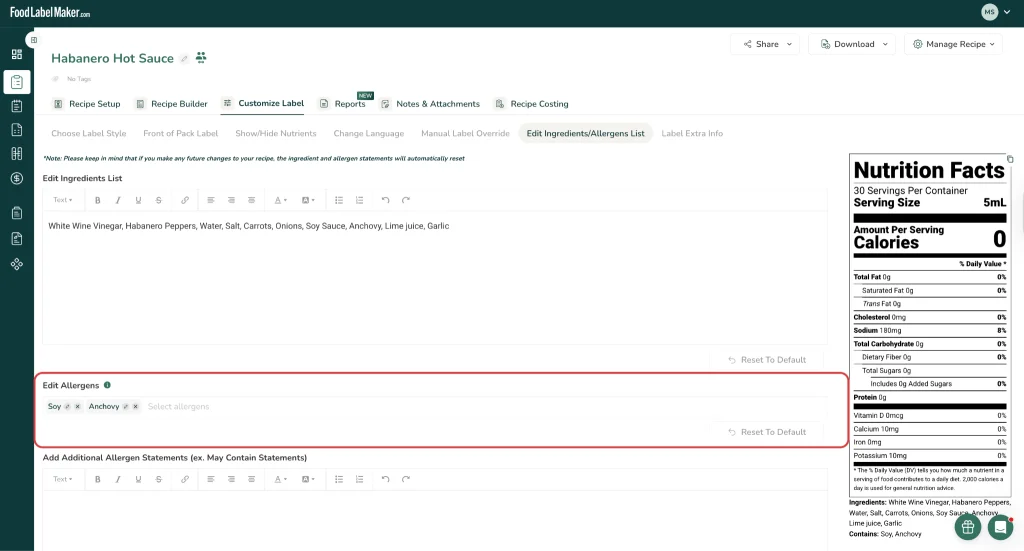
The Nutrition Facts panel is only one piece. While you’re in the label editor, add your statement of identity (the product name, “Hot Sauce”), the ingredient list in descending order by weight, the net quantity of contents in the bottom 30% of the front panel (here, Net 5 fl oz / 148 mL), and your manufacturer or distributor name and address. Pay closest attention to allergens. Our sauce triggers two under FALCPA: the anchovy makes it a fish allergen, and the soy sauce makes it a soy allergen, so the label carries a “Contains: Soy, Anchovy” statement. These are exactly the ingredients food manufacturers forget to declare.
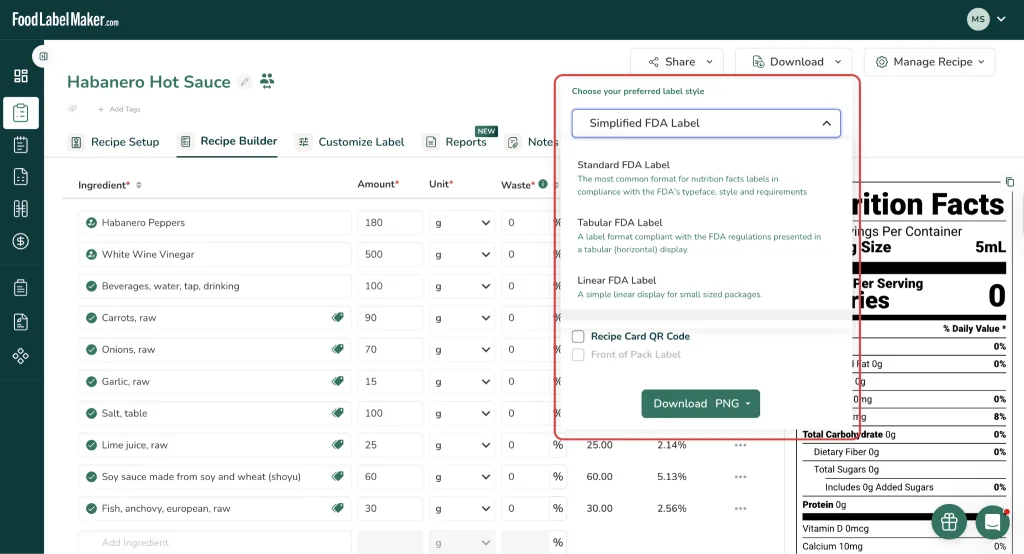
Step 7: Choose your format and export.
Pick the layout that fits your bottle, turn on the simplified format since this sauce qualifies, and export. Keep any voluntary elements like a Scoville rating well clear of the Nutrition Facts panel so they don’t read as an official declaration.
Final Thoughts: Creating Compliant Hot Sauce Nutrition Facts Labels
Hot sauce hides real complexity behind a short ingredient list. The 1 teaspoon serving size sends almost every nutrient to zero while leaving sodium as the one number that drives your claims, and the ingredients that bring the most flavor, like anchovy and soy sauce, are often the ones makers forget to declare as allergens. Get those two things right and the rest of the label falls into place.
Food Label Maker handles the serving size, rounding, claim thresholds, and allergen declarations for you, so the panel comes out compliant the first time. If you’d rather have it done for you, our regulatory experts will review your recipe and build a fully compliant label start to finish.
Frequently Asked Questions about Hot Sauce Nutrition Labels
1. Is My Hot Sauce An Acidified Food?
Possibly, and it changes how you’re allowed to produce it. Under 21 CFR Part 114, a hot sauce is an acidified food if its base is low-acid (natural pH above 4.6) and you add vinegar or another acid to bring the finished pH to 4.6 or below. That triggers FDA facility registration, a filed scheduled process, and pH record-keeping. Naturally acidic, vinegar-forward sauces with only small amounts of low-acid ingredients are often excluded as condiment sauces. The deciding factor is your finished equilibrium pH, so get it tested before you produce at scale.
2. What Is The Serving Size For Hot Sauce?
The FDA reference amount (RACC) for hot sauce is 1 teaspoon, which is shown on the label as 1 tsp (5 mL). It falls under the “Minor condiments” category, and this serving size is what causes most nutrients on the panel to round to zero.
3. Why Does My Hot Sauce Label Show All Zeros Except Sodium?
At a 5 mL serving, calories, fat, carbohydrate, and protein are too small to round up from zero under FDA rules, while sodium stays high enough to display. In our example sauce it shows 180mg (8% DV). A column of zeros with one sodium value is the correct, compliant result and shouldn’t be “fixed.”
4. Can I Label My Hot Sauce “Low Sodium”?
Only if it contains less than 140mg of sodium per serving. Most hot sauces use enough salt to exceed that, so the claim usually doesn’t qualify. Keep in mind that making any nutrient content claim also removes the small-package labeling exemption, forcing a full Nutrition Facts panel even on a tiny bottle.
5. Do Small Hot Sauce Bottles Need A Nutrition Facts Panel?
Bottles with less than 12 square inches of available label space may qualify for an abbreviated panel or a full exemption. That exemption disappears the moment you make any nutrient content claim, so a “low sodium” or “sugar free” bottle needs the full panel regardless of size.