

Easy and Compliant Nutrition Label Maker Software for Food Brands
Our nutrition facts label maker helps food businesses create accurate, audit-ready labels without costly lab tests or spreadsheets.
We offer:
- Accurate nutrition facts from a verified 500,000+ ingredient database
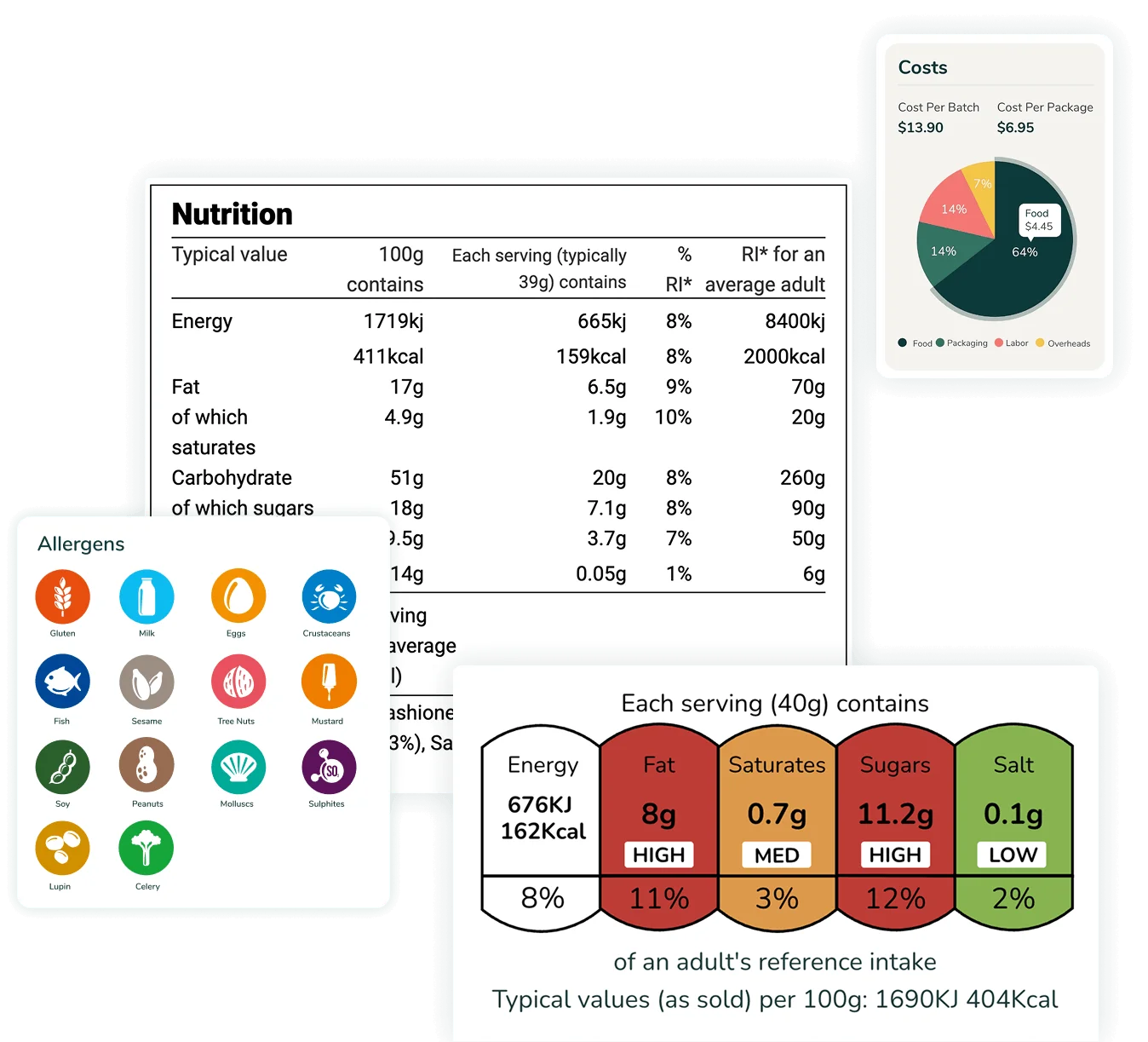
- Compliant label formats for the UK, EU, US, Canada and more
- Recipe and menu management in one place
- Expert regulatory and customer support
Nutrition Label Maker Software Trusted By Global Brands




Key Capabilities of Our Nutrition Label Maker Software
Start with verified ingredient data, build and refine your recipes, create Nutrition Facts labels that meet each market’s rules, then share detailed reports with your team and customers.
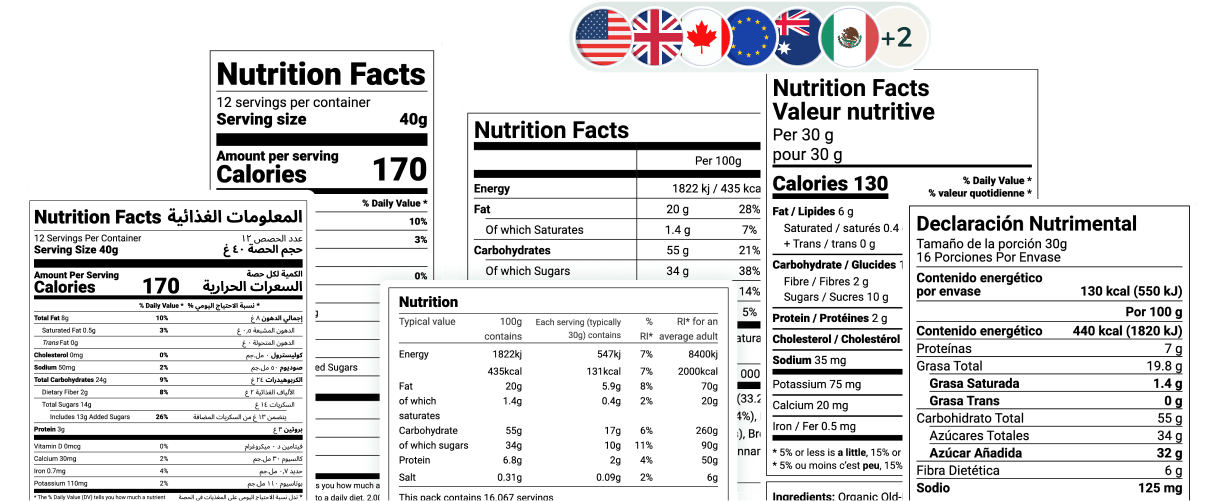
Compliant Nutrition Labels (8+ Markets with Multiple Label Styles and Formats)
Create compliant labels for every market without re-entering recipe data.
US: standard, tabular, linear, simplified, dual-column, aggregate, children and infants
Canada: standard, dual-column, bilingual, linear (English/French), children and infants
Mexico: standard (Spanish) and standard dual language (Spanish/English)
GCC: Arabic, Arabic/English, table format and SFDA warning label
UK, EU, Australia & New Zealand: standard
Front-of-Pack Labels
Generate front-of-pack labels from your recipe data, including Canada’s Front-of-Pack Nutrition Symbol, Mexico’s Octagonal Warning Seals, the EU’s Nutri-Score, the UK’s Front-of-Pack Traffic Light Label and the Australia & New Zealand Health Star Rating, each with a full breakdown of how the result is calculated.
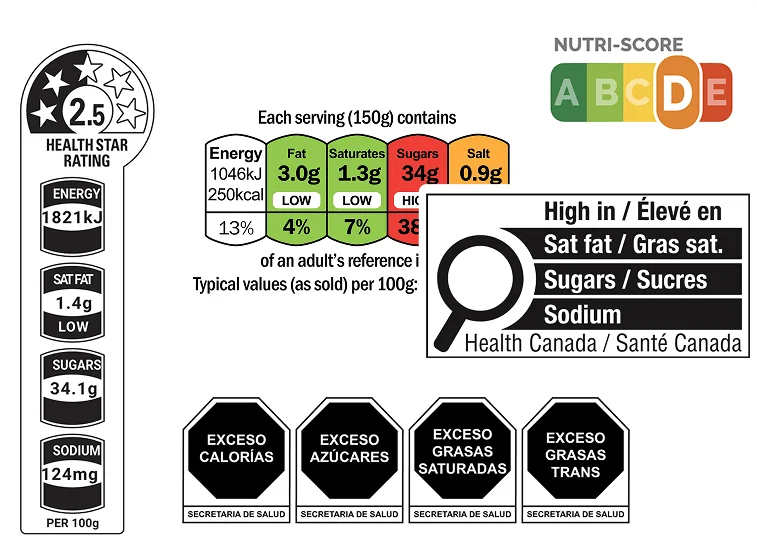
Available on Enterprise only
Learn more
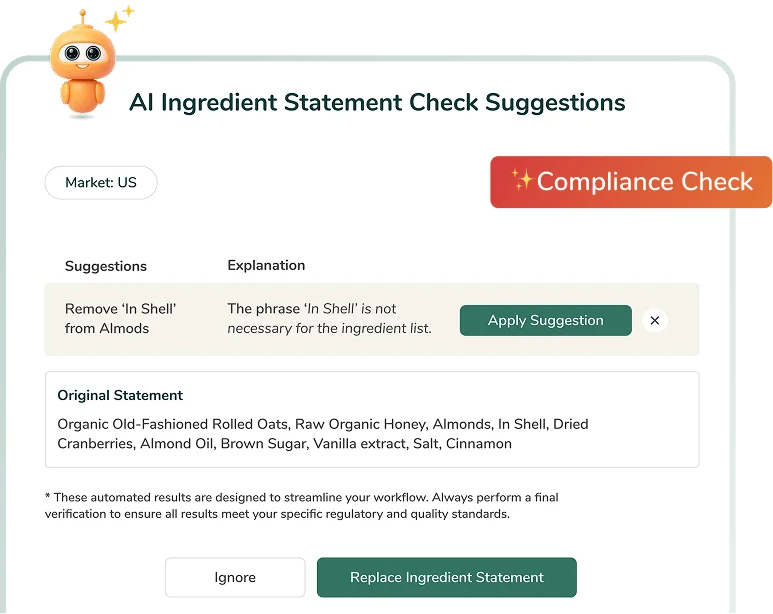
AI Ingredient Statement Check
Catch wording issues in your finished ingredient statement before it goes to print. R.I.A., our AI assistant, reviews it and gives you plain-language fixes you can apply in one click.
Available on Professional and Enterprise
Learn more
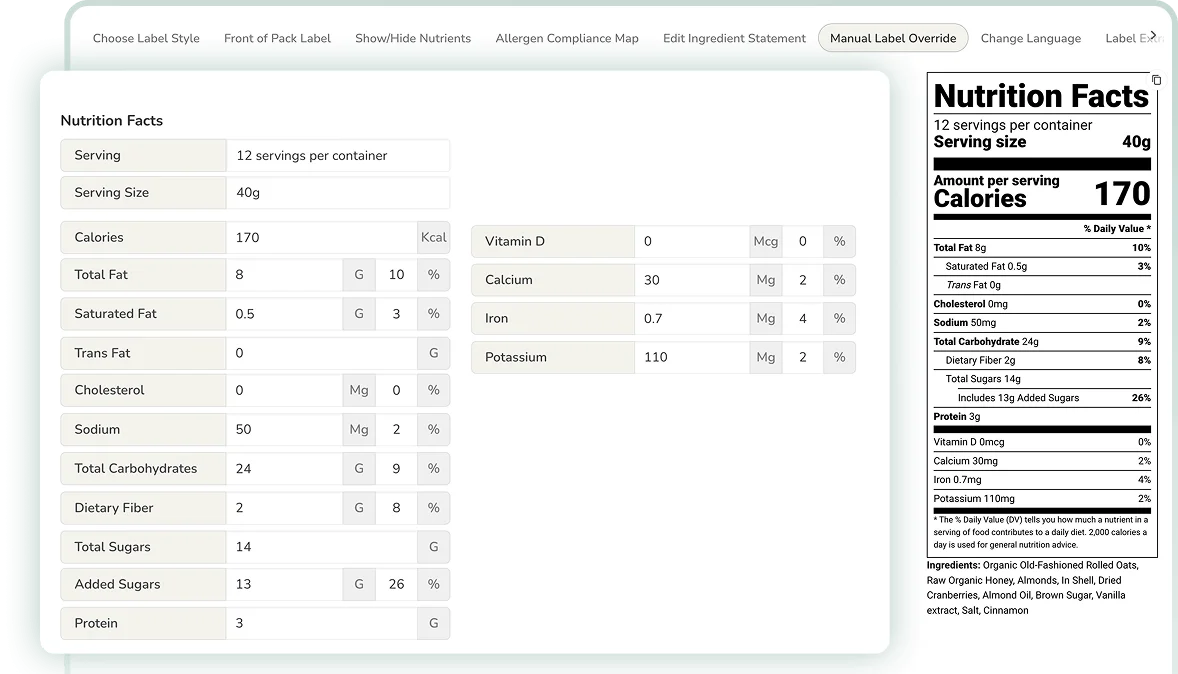
Manual Label Override
Adjust values directly on your label when you need to match lab analysis results or supplier data, while keeping full control over what goes to print.
AI-Assisted Recipe To Label Builder
Paste or upload a recipe as text, a PDF or a Word document and get a draft label in minutes, with ingredients matched, units converted and allergens flagged for your review.
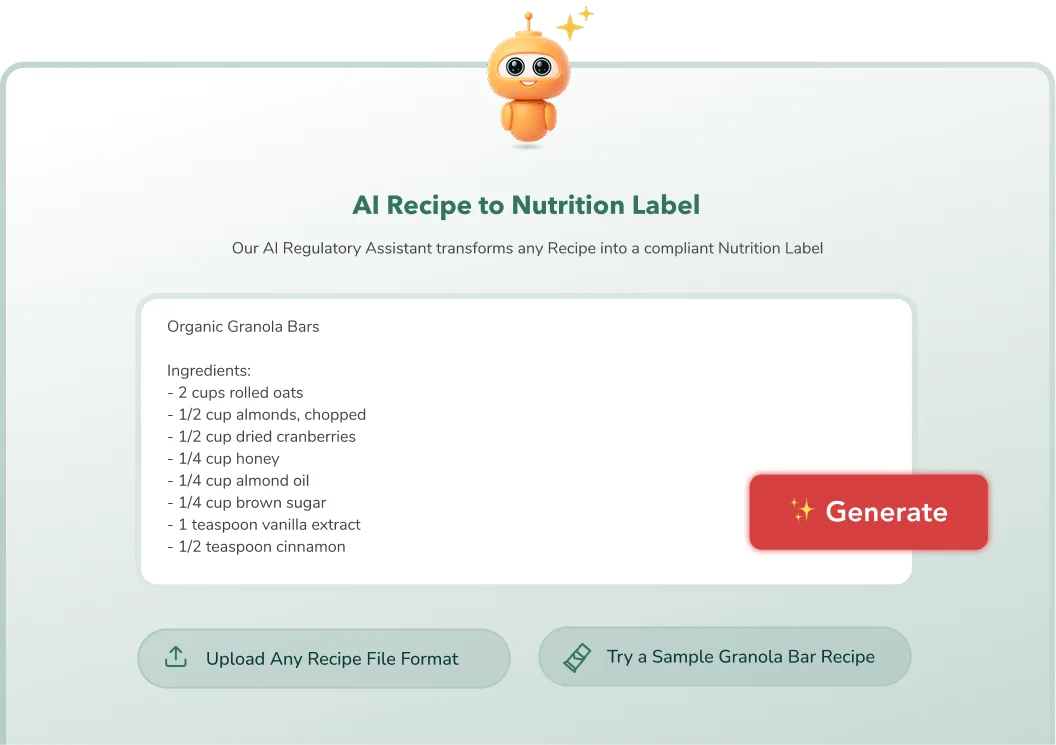
Available on Plus, Professional and Enterprise
Learn more
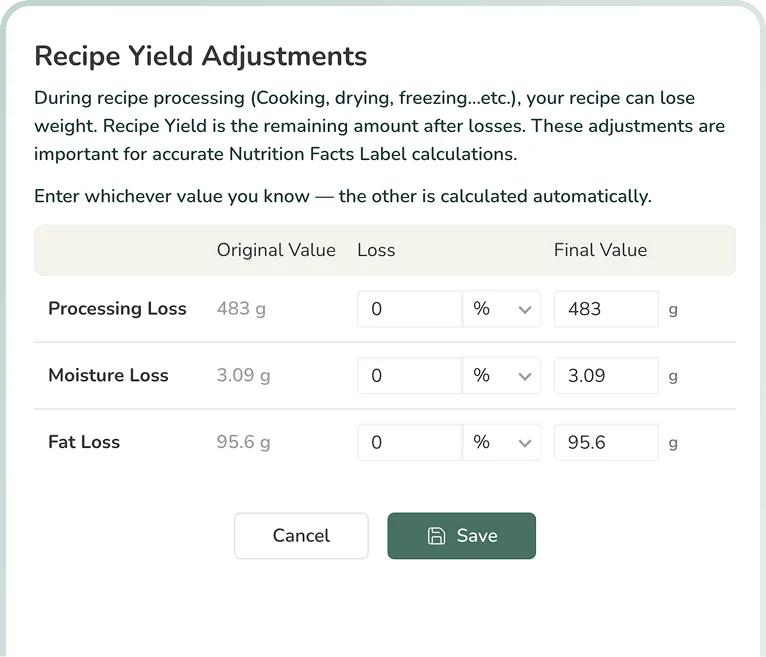
Recipe Yield Adjustments
Account for moisture and fat lost during cooking, baking, frying or drying, so your label reflects the nutrition of the finished product, not the raw ingredients.
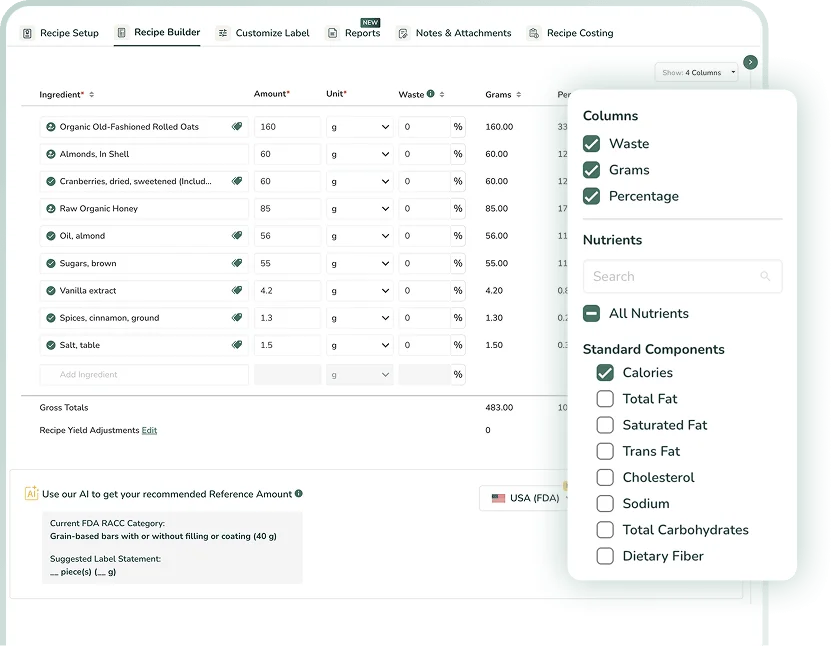
Dynamic Formulation View
Add any nutrient, vitamin or mineral as a column to compare each ingredient’s contribution side by side, alongside waste, weight and percentage. Every change updates your label in real time.
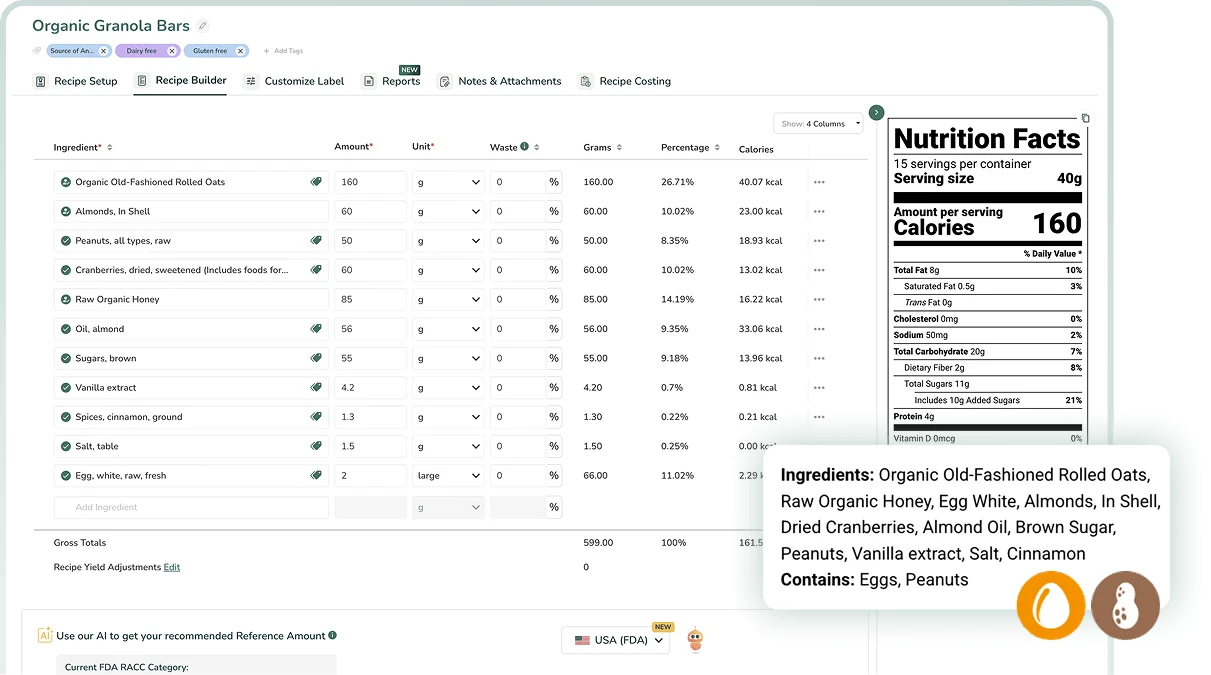
AI-Assisted Allergen Detection
Allergens are identified automatically as you add ingredients, based on each market’s requirements, with an added AI check to help you catch anything before you print.
Available on Enterprise only
Learn more
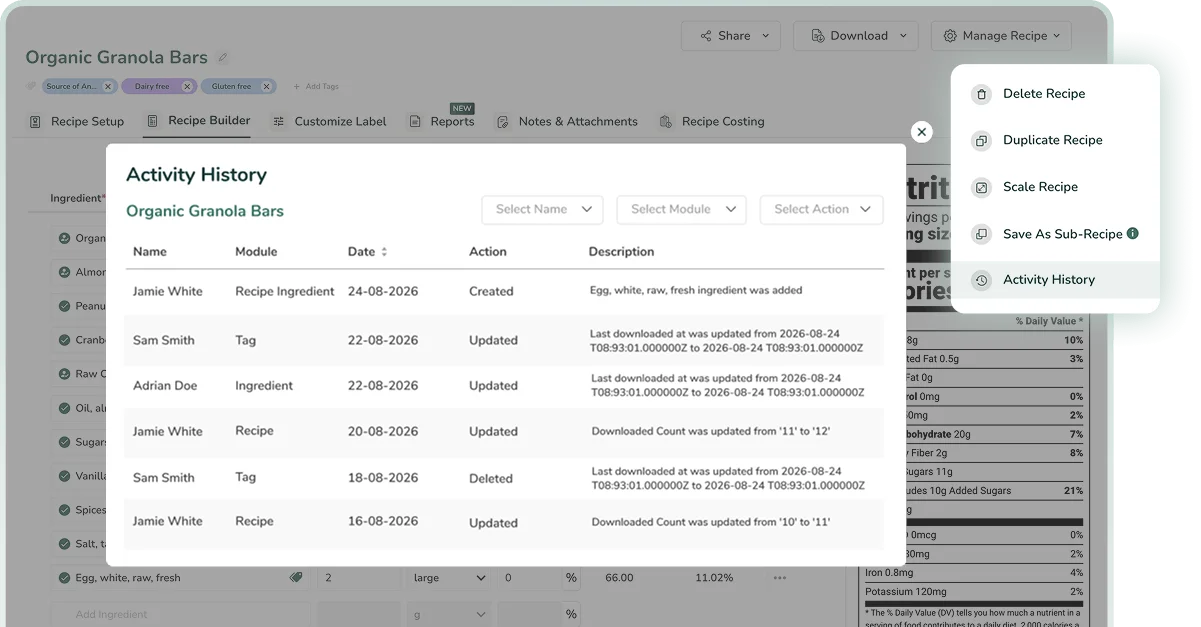
Ingredient & Recipe Activity History
See who changed what and when across every ingredient and recipe, giving you a complete audit trail for inspections, recalls and reformulations.
Verified 500,000+ Ingredient Database
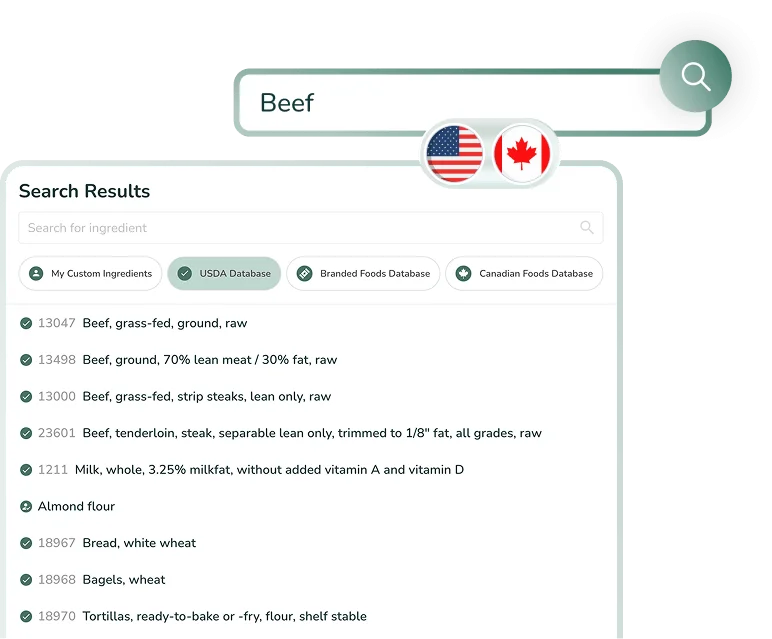
Build recipes from over 500,000 ingredients sourced from USDA FoodData Central, branded foods and the Canadian Nutrient File, with regular quality checks by certified nutritionists.
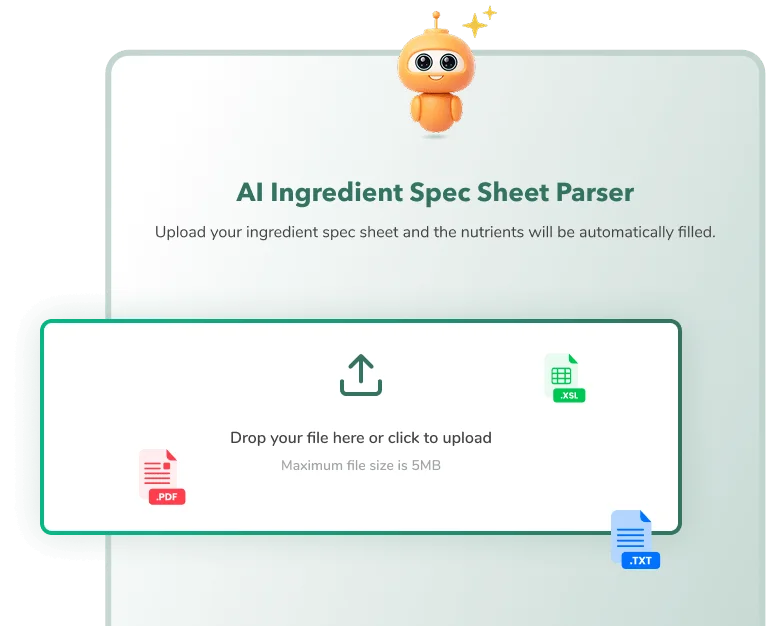
AI Ingredient Spec Sheet Parser
Turn supplier spec sheets into ready-to-use ingredients without manual data entry. Upload a PDF or image, then review the extracted nutrition, allergen and ingredient details.
Ingredient & Recipe Tags
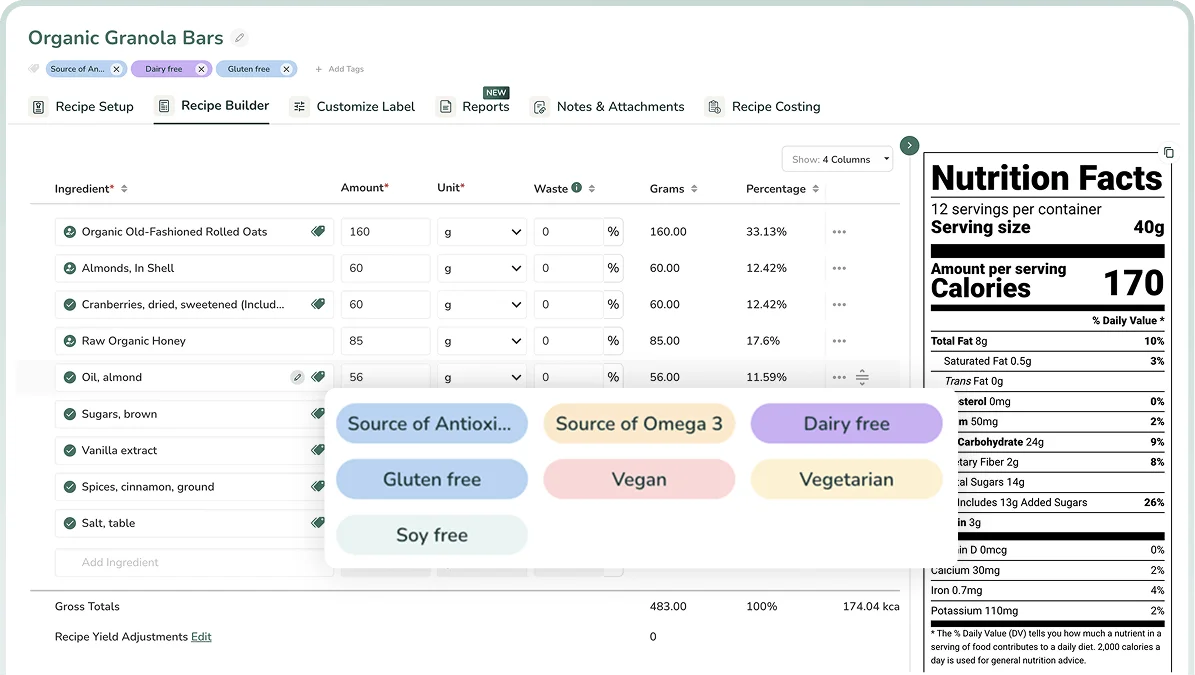
Organise ingredients and recipes your way with preset or custom tags, so your team can filter by product line, certification or allergen and find what they need fast.
Available on Enterprise only
Learn more
Custom Spec Sheet Builder
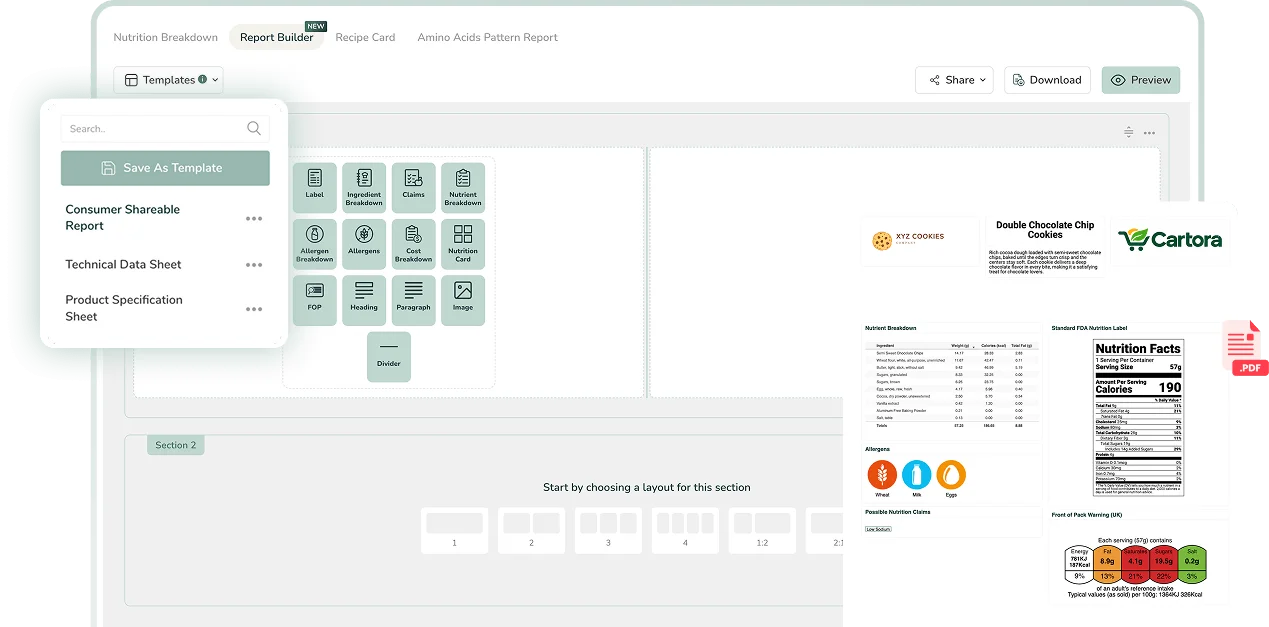
Turn any recipe into branded technical data sheets and product specification sheets using ready-made templates. Customise sections and layout, and share dynamic QR codes that update automatically when your recipe changes.
Available on Professional and Enterprise
Learn more
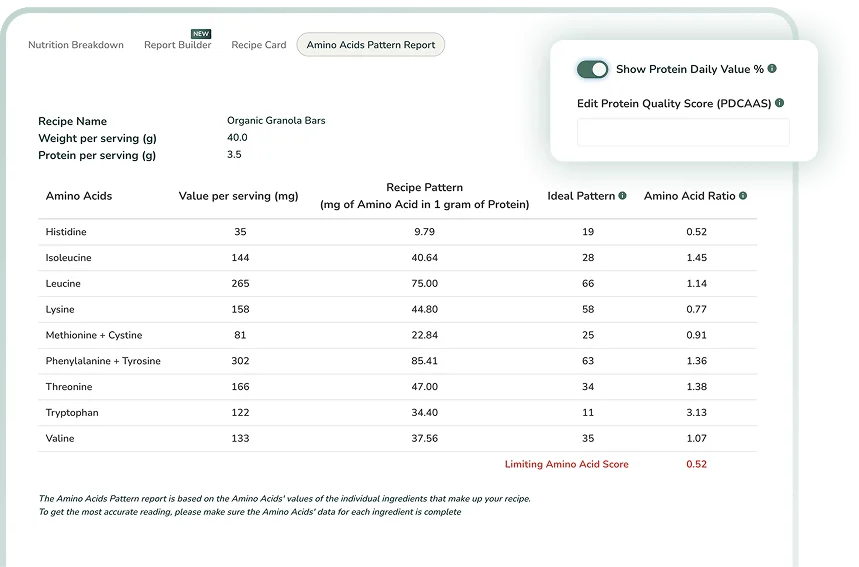
PDCAAS and Amino Acid Pattern Report
Calculate protein quality using your recipe’s amino acid pattern, so your label shows an accurate protein %Daily Value and your “Good source” or “Excellent source” protein claims are backed by the required PDCAAS score.
Available on Professional and Enterprise
Learn more
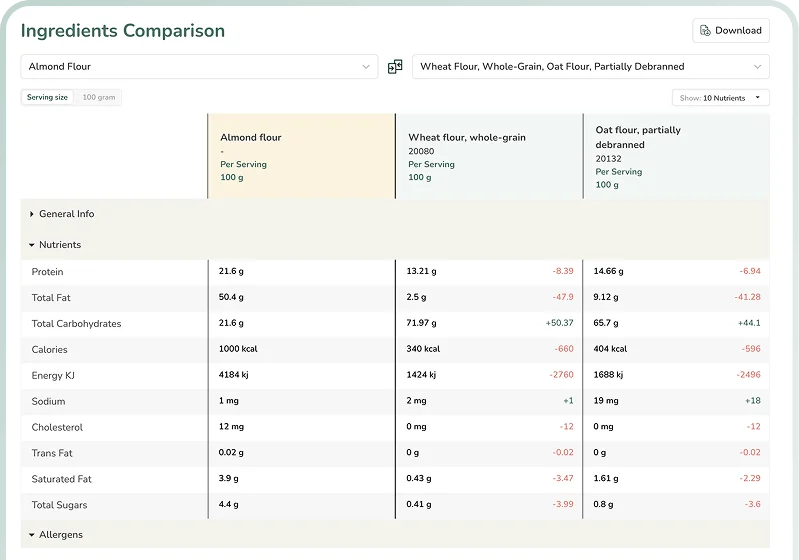
Ingredient & Recipe Comparison Reports
Compare up to three ingredients side by side to see their nutrition and allergen differences at a glance, so you can choose healthier, compliant and cost-effective options when formulating.
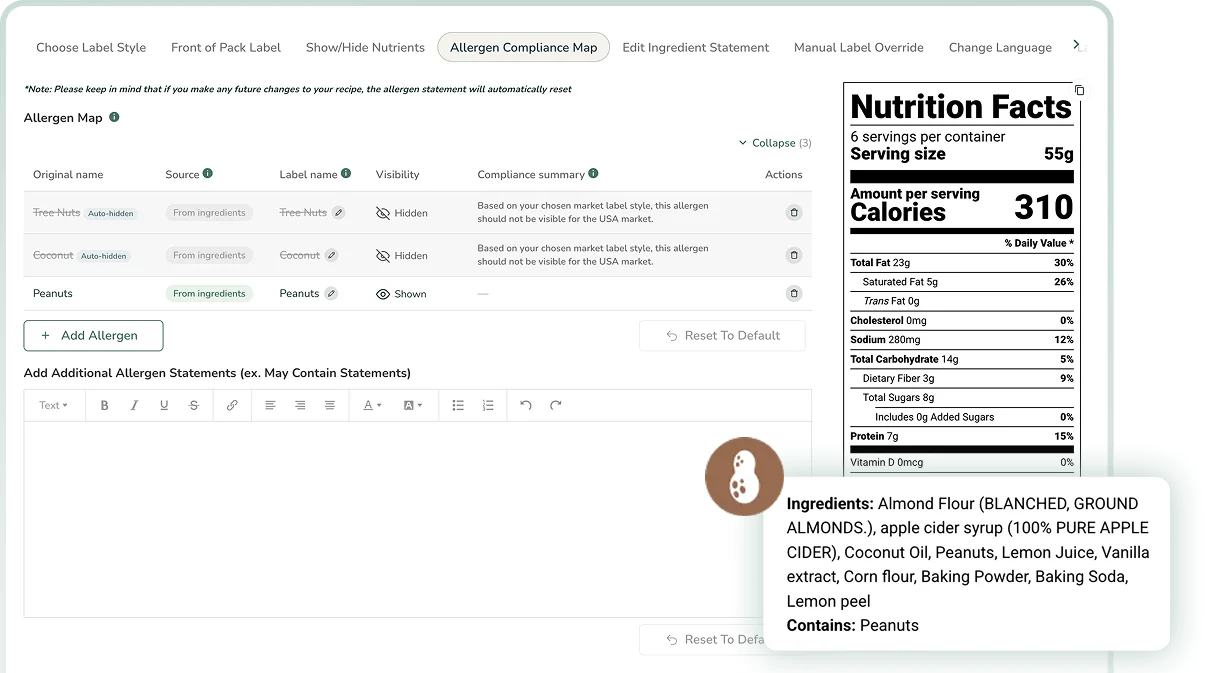
Allergen Compliance Mapping
See every allergen in your recipe in one place, with label names and visibility adjusted automatically for your market. Edit declarations, add missing allergens and include “May contain” statements for cross-contact risks.
Paste Your Recipe.
Get a Compliant Nutrition Label.
Ingredients and quantities are enough. We calculate the nutrition, flag allergens, and format the label for your market.
Please paste a recipe above before generating.
Built to Scale with Your Business
Food Label Maker creates compliant labels from a verified ingredient database, so your products meet global standards as your team grows.

Custom API Integration
Connect Food Label Maker to the platforms your team already uses so recipe and label data stays in sync.

Advanced Security & Privacy
SOC 2 Type II compliant, with multi-factor authentication, single sign-on and role-based access control.

Tailored Capabilities & Reports
Custom capabilities and reports built around how your team works.

Hassle-Free Data Migration
We move your existing ingredient and recipe data into Food Label Maker for you.
See Food Label Maker in Action
Food Label Maker’s Expert Support Services
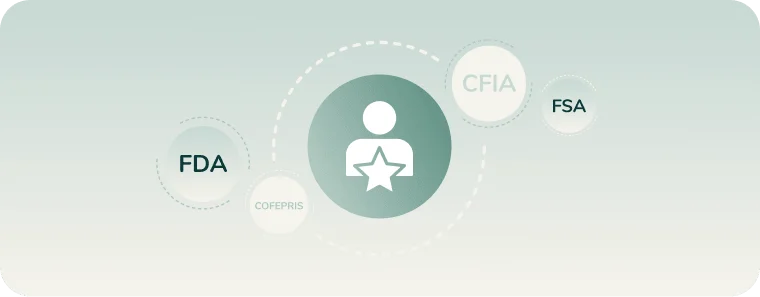
Hire a Labelling Consultant
Work with a food labelling consultant who checks your label’s nutrition values, format and ingredient list against FSA, FDA, CFIA, COFEPRIS, DG SANTE, FSANZ and GSO rules.
Get a Protein Quality (PDCAAS) Report
Making a protein claim? The FDA requires a PDCAAS-corrected %DV for protein, and our experts calculate your score so your claim holds up. Learn how PDCAAS is calculated.

Have Your Packaging Artwork Reviewed
Send us your finished label design and our nutrition experts will review the nutrition table, ingredients, allergens, net quantity and claims, with a clear report on anything that needs fixing.
Industries That Use Our Nutrition Labelling Software
Our nutrition label software combines accurate nutritional analysis with strict UK and global compliance. Equipped with multiple features for label and recipe customisation, our cloud-based solution adapts to the unique operational needs of any business—whether you run a single kitchen or an enterprise manufacturing plant.
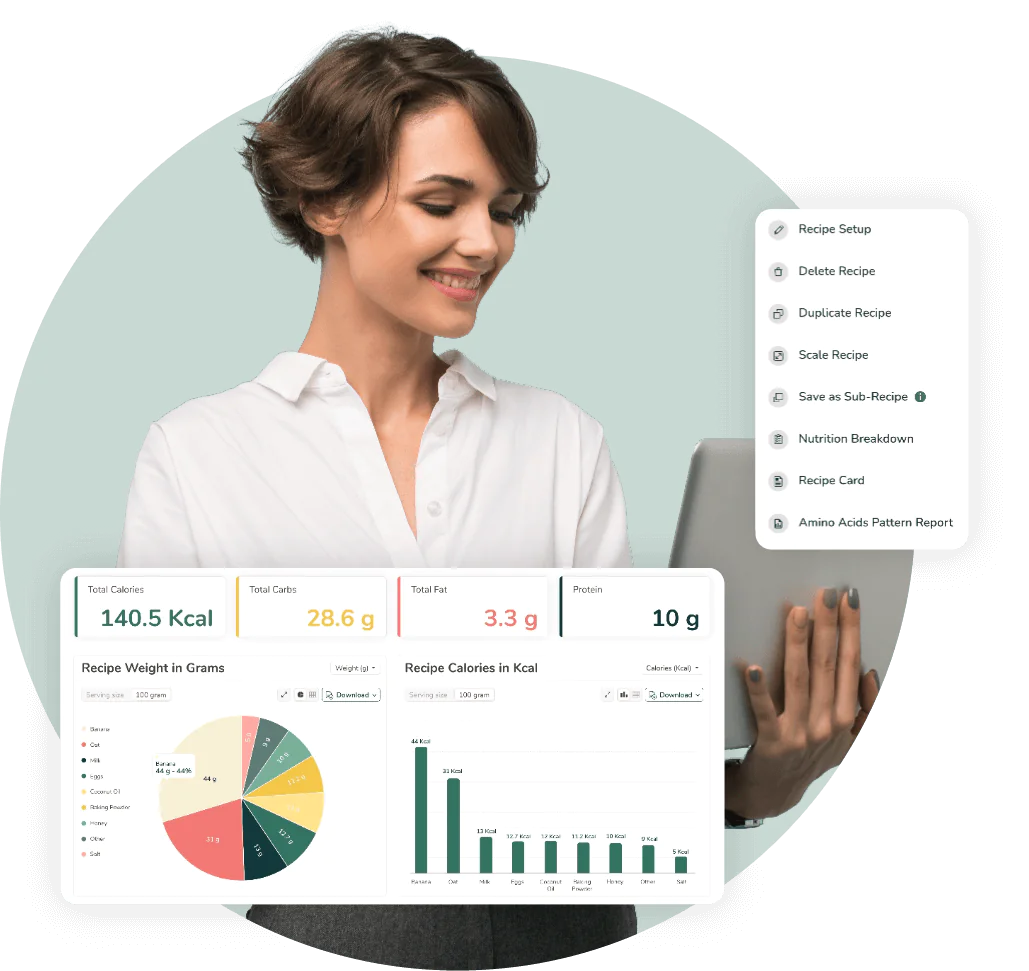
Food Manufacturers
For food manufacturers seeking to streamline operations or scale their business, speed, accuracy and compliance are non-negotiable. Our software integrates recipe costing and nutrition analysis into one workflow, allowing you to generate UK-compliant nutrition labels for hundreds of recipes in an instant. Maintain control and ensure consistency across all your packaged goods.
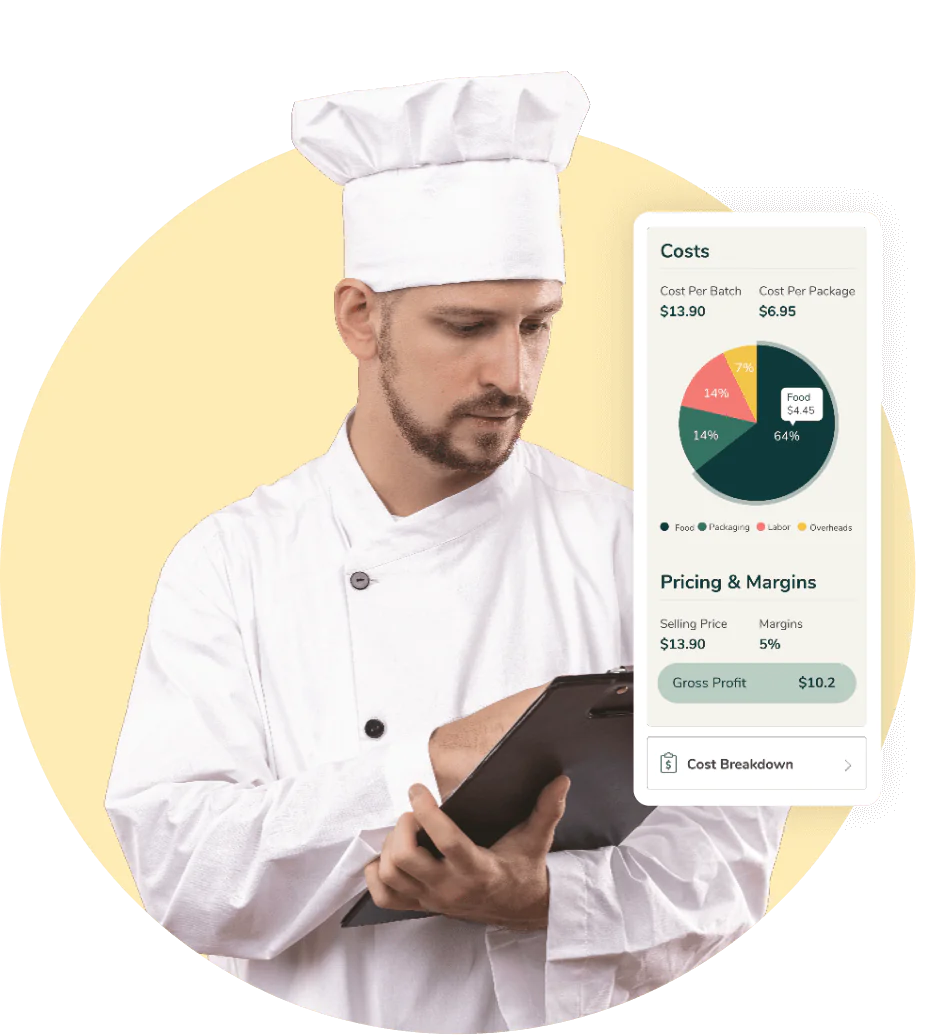
Restaurants & Food Service Businesses
We help restaurants and food service chains calculate precise calorie counts, display allergen disclaimers and consolidate macro profiles for menus and display boards. Build consumer trust by offering transparent allergen disclosures and nutritional data that meets the demands of today’s health-conscious diners.

Hospitality & Hotels
Our software provides centralised and user-friendly nutrition label creation for hotels and hospitality groups, ensuring that every room service meal or grab-and-go item carries a compliant food label. Streamline your operations and reduce any legal risk by managing all your recipe data in one secure place.

Meal Plan Companies
Meal plan companies rely on our software to handle the heavy lifting of allergen declarations, recipe scaling and accurate macro calculations. Whether your menu rotates weekly or caters to specific dietary needs (Vegan, Paleo, etc.), our software automates the nutrition labelling process, ensuring your subscribers get accurate nutrition facts and ingredient lists with every delivery.
Reviews From Our Customers
Practical Compliance Guides &
Food Labelling Tips
Navigate the complex landscape of food regulations with confidence. Explore our blog and regulatory hub for the latest industry updates, practical tips on food label creation, and detailed guides on using our nutrition label software to simplify your compliance process.


A Straightforward and Efficient Nutrition Label Maker
Create accurate, compliant nutrition labels in minutes, with no lab tests or spreadsheets.
Frequently Asked Questions
About Nutrition Labelling Software
01
Why should I use Food Label Maker’s Nutrition Labelling Software instead of other tools or software?
Food Label Maker is a standout software choice because it combines ease of use with verified regulatory accuracy. Unlike generic tools or spreadsheets requiring manual input, our platform offers a comprehensive range of benefits, including but not limited to:
- Purpose-built compliance: We offer direct integration between recipe analysis, label creation, and costing.
- Automated Intelligence: Features like AI-enabled spec sheet parsing and automatic allergen detection save hours of manual data entry.
- Audit-Ready Formats: We provide compliant nutrition label templates for 8 major markets, including the FSA, FDA, CFIA, EU, and more, ensuring you are always inspection-ready.
Trusted by over 10,000 businesses, we offer the reliability and expert support that free tools simply cannot match.
Create a free label to experience the software firsthand or view our pricing plans to see which plan might suit your company best.
02
Can I use AI like ChatGPT to create my nutrition facts labels?
While AI is a great tool for brainstorming, it cannot guarantee the mathematical accuracy or regulatory compliance required for food labelling. Generic AI models often “hallucinate” nutrient values and cannot calculate complex factors like moisture loss or fat absorption during cooking. FoodLabelMaker.com uses verified, government-standard databases and built-in compliance engines to ensure your labels meet strict FDA, CFIA, or UK/EU regulations – protecting your brand from costly errors or product recalls that “AI-generated” guesses might cause.
We designed our software to be intuitive and easy to use. Create a free label and try it out for yourself.
03
With which regulatory standards and bodies is our Nutrition Labelling Software compliant?
Our software is engineered for global market access, ensuring your products meet the strict standards of major regulatory bodies. We support compliance with:
- UK (FSA) – Supporting front-of-pack (traffic light) labels and back-of-pack label formats.
- FDA (USA) – Including standard, tabular, linear, simplified, and dual column formats.
- CFIA (Canada) – Fully supporting the latest bilingual labelling requirements.
- EU (European Union)- For mandatory 100g/ml declarations.
- FSANZ (Australia & New Zealand) – Automatically generating the mandatory dual-column layout showing both per-serving and per-100g values.
- COFEPRIS (Mexico) – Fully compliant with NOM-051 standards with comprehensive support for Spanish-language labelling as well as bilingual (English/Spanish) formats.
- GSO (GCC / Gulf States) – Meeting strict requirements for bilingual Arabic-English labels and mandatory declarations for added sugars and trans fats.
This multi-jurisdictional support allows you to export compliant labels for different regions from a single recipe profile. Generate a free label today or sign up to see these formats in real time.
04
Can I link my nutrition labels to recipe costing and management tools?
Yes, seamless integration is a core feature of Food Label Maker’s platform.
When you build a recipe for a nutrition label, the software automatically utilises that same data for recipe costing and management. This means any change to an ingredient quantity instantly updates your nutrition facts and your profit margin calculations simultaneously.
You can also track ingredient costs, set selling prices, and monitor waste—all within the same dashboard used for compliance.
Learn more about our recipe costing and recipe management software.
You can also sign up for free to try our nutritional label generator, recipe costing and recipe management tools.
05
What is the most cost-effective nutrition label maker?
For businesses seeking a balance of professional compliance and affordability, Food Label Maker is a highly cost-effective solution. We offer flexible subscription plans tailored to your scale:
- Basic ($49/month or $299/year): 1 market of your choice and up to 50 recipes a month. Includes the verified 500,000+ ingredient database, automated allergen identification, editable ingredient and allergen statements, and Front of Pack label formats. Best for startups and small food businesses creating their first compliant labels.
- Plus ($99/month or $588/year): 1 market and up to 75 recipes a month. Adds recipe costing, recipe yield cooking adjustments, nutrition and allergen breakdown reports, built-in label translation, high-resolution exports and 24/7 live chat support. Best for growing businesses with more products and more detailed labelling needs.
- Professional ($199/month or $1,188/year): 2 markets of your choice and up to 100 recipes a month. Adds protein quality adjustment (PDCAAS), manual label override, menu label and amino acid reports, label sharing by link or QR code, and 2 free hours a month with a nutrition expert and a regulatory expert. Best for established brands selling in more than one market.
- Enterprise (custom pricing): 8+ markets, unlimited recipes and unlimited users. Adds single sign-on, role-based access control, ingredient and recipe change history, a custom spec sheet builder, free data migration and API integration, and unlimited priority support. Best for larger teams that need multiple users and multi-market compliance.
Yearly plans include 6 months free and 2 free nutritional consultations.
By eliminating the need for expensive lab testing (which can cost $800+ per item) and combining labelling, costing, and menu planning into one tool, we provide significant ROI compared to outsourcing or purchasing disjointed software. View our pricing plans or generate a free nutrition label today.
06
Can I make my own Nutrition Facts label?
Yes, but it’s important to ensure accuracy and adherence to specific regulatory guidelines and labelling practices.
To do it correctly, you must:
- Source Data: Gather precise nutrient data for every ingredient and their quantities.
- Calculate Values: Account for recipe yield and moisture loss to ensure accurate nutritional analysis.
- Format Correctly: Adhere to FSA-compliant formatting, such as font sizes, hairline thicknesses, and nutrition facts panel layouts. Also, ensure that you include standard information like serving size, calories, macronutrients (carbohydrates, fats, proteins), vitamins, and minerals.
Using software to assist you might be more helpful and will ensure that your label provides accurate and helpful information. Create a free nutrition label to see how Food Label Maker’s tool simplifies compliance, or speak to a labelling expert from our team for further advice.
07
Does the FSA check Nutrition Facts?
Yes, the Food Standards Agency (FSA) and Local Authorities are responsible for overseeing and regulating the accuracy of nutrition labels in the UK. Using compliant software is critical to ensure your labels meet these rigorous legal requirements and avoid the risk of costly regulatory action.
The authorities set specific guidelines for labelling requirements, which include the format, content, and presentation of food information. They will take necessary action—such as Improvement Notices or fines—if the labelling is found to be inaccurate or non-compliant with the established UK regulations.
Don’t risk non-compliance. Create a free nutrition label today or read more about the FSA’s food labelling regulations.
08
How do you verify Nutrition Facts?
Verifying Nutrition Facts requires a systematic approach that combines accurate data sourcing, recipe analysis, and regulatory cross-referencing.
To ensure your nutritional values are accurate, follow this process:
- Recipe Analysis: Start by analysing the recipe or formulation for your food product. Determine the quantities and specific brands of ingredients used.
- Nutrient Calculation: Use reliable sources such as food databases or nutrition label software to calculate the nutritional content of each ingredient. Ensure accuracy by cross-referencing multiple sources.
- Serving Size Determination: Determine the appropriate serving size for your product based on how it is typically consumed. This will be the reference point for the nutritional values listed on the label.
- Accurate Measurements: Ensure precise measurements of ingredients during the manufacturing process. Use calibrated scales and measuring tools for accuracy.
- Lab Testing (Optional): Although not as accurate as ingredient-based software analysis, you could consider sending samples of your product to a laboratory for nutrient analysis. This can be especially useful for complex or unique products.
- Compliance with Regulations: Ensure your Nutrition Facts label adheres to local labelling laws and guidelines, such as those set by the FSA in the United Kingdom. Verify that your label includes all required information and follows the formatting guidelines.
- Consultation with Experts: Consider consulting with nutritionists, dietitians, or food labelling experts to review your Nutrition Facts label and verify its accuracy.
Remember, accurate nutrient analysis is crucial for providing reliable information to consumers, promoting transparency, and complying with regulatory requirements.
Create a free food label using Food Label Maker’s intuitive labelling software. Our tool simplifies compliance, allergen disclosures, nutrient claims, and other mandatory elements of a nutrition label.
09
What is the new format for FSA Nutrition Facts?
- Standardised Reference (100g/100ml): Unlike the FDA’s focus on “per serving,” UK regulations (Food Information Regulations 2014) require nutritional data to be declared per 100g or 100ml. This allows for easy comparison between products.
- Energy Unit Declaration: Energy content must be listed in both kilojoules (kJ) and kilocalories (kcal). On the “Back-of-Pack” table, the kJ value must be listed first.
- Traffic Light Labelling (FOP): The UK uses a voluntary “Traffic Light” system on the front of the pack. This uses Red, Amber, and Green colour-coding to show at a glance if a product is high, medium, or low in fat, saturates, sugars, and salt.
- Mandatory Nutrients: The “Big 7” must be listed in a specific order: Energy, Fat, Saturates, Carbohydrate, Sugars, Protein, and Salt. Unlike the US, Fiber is voluntary, and vitamins/minerals are only required if they are present in significant amounts or a claim is made.
- Allergen Emphasising: Under Natasha’s Law, all 14 regulated allergens (like milk, gluten, or mustard) must be clearly emphasised in the ingredients list using a different font, bold text, or a background colour.
- Reference Intakes (RI): The UK uses “Reference Intakes” instead of “Daily Values.” These benchmarks are based on the requirements of an average adult woman (2,000 kcal) to help consumers contextually understand nutrient levels.
These regulations apply to most pre-packaged foods in the UK, with specific exemptions for small businesses that sell directly to consumers or local retailers.
Generate a free label to see our tool in action.
10
Why use a nutrition facts label maker?
Using a nutrition facts label maker is the most convenient and cost-effective way to ensure FSA compliance, nutrition label accuracy, and save time spent on tedious label calculations or nutritional analysis.
Specialised software offers:
- Convenience: Nutrition Facts Label makers provide a user-friendly and efficient way to create professional-looking Nutrition Facts Labels. They often have pre-designed templates and automated calculations based on FSA regulations, making the nutrition labelling process quicker and easier.
- Accuracy: Nutrition facts label makers are typically equipped with comprehensive databases of ingredients and heavily researched nutritional information. This helps ensure accurate calculations and eliminates the risk of manual errors.
- Compliance: Nutrition Facts Label makers are designed to adhere to FSA labelling regulations and guidelines. They can automatically generate labels that meet the required format, content, and presentation, reducing the chance of non-compliance.
- Customisation: Many nutrition facts label makers allow for customisation, such as adding company logos, changing fonts or colours, and adjusting label sizes. This enables businesses to create labels that align with their branding and product packaging.
- Time and Cost Savings: By automating the label creation process, label makers save time and effort compared to manually designing and calculating nutrition labels. They also help avoid potential costs associated with label errors or non-compliance.
- Professional Appearance: Label makers produce high-quality labels that look polished and consistent. This can enhance the overall presentation of your product and instill consumer trust and confidence.
However, it is important to note that while nutrition facts label makers can simplify the label creation process, it is still essential to ensure the accuracy of the information input into the software and review the generated labels for any potential errors or inconsistencies.
Create a free nutrition label instantly with Food Label Maker’s software and see why businesses in the food industry rely on our tool for daily label creation.
11
What is the best nutrition facts label maker?
The best nutrition facts label maker combines accuracy, ease of use, and strict adherence to global regulatory labelling standards. Modern nutrition labelling solutions are integrating AI-powered features to eliminate manual data entry errors and ensure total alignment with ever-changing global regulations.
Food Label Maker is an ideal nutrition label maker for food companies because it is built by certified nutritionists and automatically handles complex calculations.
Key advantages include:
- Verified Accuracy: Access a continuously updated database of 500,000+ ingredients.
- Global Compliance: Generate labels for the UK (FSA), the US (FDA), Canada (CFIA), the EU, and more.
- Scalability: Features like API integration and recipe management support businesses as they grow.
- AI-Enabled Automation: Automate complex tasks, from identifying allergens to suggesting claims, all while minimising human error.
Ready to take control of your product formulations? Generate a free nutrition label with Food Label Maker and experience the best nutrition analysis software on the market.
12
What should I do if I just need to create a basic nutrition label?
If you only need one basic nutrition label, start with the simplest workflow: add your recipe ingredients, confirm the serving size, choose the relevant label format, and review the generated nutrition panel before using it on packaging.
Food Label Maker can still help with a basic label because the software handles the parts that are easy to get wrong manually, including rounding rules, serving-size logic, nutrient calculations, label layout, allergen statements, and regulatory formatting. You do not need design skills to create a professional label, and you can use the free label generator or sign-up flow to test the process before choosing a paid plan.
13
What features do I need from nutrition label maker software if I am a small business or a larger food company?
A small business usually needs a nutrition label maker that can create compliant labels quickly, manage a limited number of recipes, support common label layouts, and reduce manual calculation errors without needing a large compliance team.
A larger food company usually needs deeper workflow features, such as unlimited recipes, multi-user access, approval controls, recipe and ingredient change history, custom ingredients, multiple label formats, recipe costing, high-resolution label exports, and support for different markets.
Food Label Maker supports both use cases: smaller teams can create professional labels efficiently, while growing manufacturers can use advanced features for regulatory compliance, recipe management, nutrition analysis, and label generation across larger product ranges.
14
Is your nutrition label maker software compliant with UK and other labelling guidelines?
Yes. Food Label Maker is designed to help food businesses create compliant nutrition panels for major markets, including UK and EU formats, FDA labels for the US, CFIA labels for Canada, COFEPRIS requirements for Mexico, FSANZ labels for Australia and New Zealand, and GSO formats for Gulf markets.
The software supports regulated label formats, serving-size checks, nutrient calculations, allergen declarations, ingredient statements, and market-specific nutrition panel requirements.